How to Reactivate a Paused Subscription
If your subscription has been Paused (Deactivated) due to an unpaid invoice or another temporary issue, you can reactivate it by completing the outstanding payment.
Before You Begin
Ensure that:
- You have access to your billing account.
- You have a valid payment method available.
- Any outstanding invoices can be paid successfully.
Steps to Reactivate Your Subscription
1. Sign in to your account.
2. Navigate to Billing → Subscriptions.
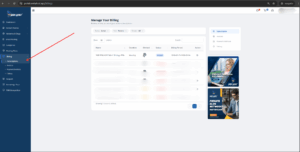
3. Locate the subscription with the Paused (Deactivated) status.
4. Click the subscription to open its details.
5. Click the Reactivate Subscription button (displayed in red).
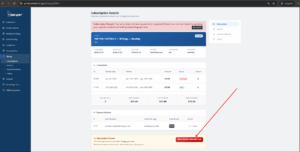
6. Review the outstanding invoice and confirm the amount due.
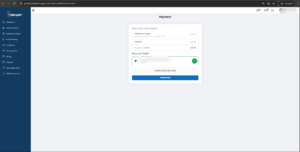
7. Complete the payment using your preferred payment method.
Once the payment is processed successfully, your subscription will automatically return to the Active status, and your services will be restored.
Important Notes
- Reactivation requires all outstanding invoices to be paid in full.
- If the payment fails, verify your payment method or contact your payment provider before trying again.
- Service access will be restored only after the payment has been successfully processed.
Need Help?
If you’re unable to reactivate your subscription or experience any payment issues, please contact our support team. Our team will help you restore your subscription and get your services back online as quickly as possible.